Friday, 17 September 2021

Project Management Methodology and the best practices


The leading business leaders are relying on project management methodologies.

Without it, the project literally gets many drawbacks.

In a recent report by Standish Group, it was observed that only “36% of projects have reached the entire requirement in a project.”

So now the question arises, why do many projects get off track?

There might be a lot of reasons for the lack of requirements in the project. But most of the projects marked a common factor. It is because of unclear directions.

So you can overcome this issue by following the project methodology.

Project management Methodology

A Project management Methodology refers to a set of principles and processes used to manage a project.

The project methodologies help in defining a governance structure, process guidelines, processes involved, test activities, and deliverables. All the features involved are necessary for project success.

So, if you want to manage your project in the best possible way, the project management methodology will help you in achieving it.

Why do you need a Project management Methodology?

Project Management methodology generally aims to standardize, organize and structure the work methods.

This helps to keep the focus on all the projects and allows you to repeat the successful aspects in every project and if any mistakes occur, you can rectify it and learn from them.

It results in continuous improvement in a project.

With Project Management methodology, you are adding more efficiency to the project.

“No matter how good the team or how efficient the methodology, if we’re not solving the right problem, the project fails” – Woody Williams

What are the various types of Project Management Methodologies?

A project becomes successful depending on the project methodology it has used. A methodology that works for you doesn’t mean the same methodology will work for the other.

Therefore it is important to understand the various methodologies and choose the right one.

Here is the list of project management methodologies to use for your project:

1. Agile:

After the dissatisfaction with the linear approach of traditional project methodologies, agile project management was developed.

Agile project management methodology was created to manage complex projects. It is an iterative and people-centric approach to project management.

With Agile Project Management Software, you can reduce the compressibility of the project by breaking down the project into small segments.

The key principle of Agile Project management methodology is:

  • Open to data-driven change

  • Quick

  • Collaborative

In many methods of Agile Project management, you can add the “work to be done” in the backlog. The team can work through various phases or cycles.

Benefits:

  • Flexibility and Freedom: As there are no fixed stages or focus only on requirements, this provides your resources more freedom to experiment and create incremental changes. This makes it fit for creative projects.

  • Low risk: Using Agile Project management, you will receive regular feedback from the stakeholders.
    This helps to get the review and change it accordingly. This reduces the risk of project failure, as the stakeholders are involved in every step.

2. Scrum Methodology:

It is a form of Agile Project Management. It is more like a framework than a project management methodology.

It solves most of the problems faced by software developers. Such as inflexible projects plan, convoluted Development Cycles, and shifts in production Schedules.

In Scrum, a small team that is led by the scrum masters works to clear all the obstacles to work more effectively.

The team works in short cycles of two weeks, which is known as “Sprints”. The team members held daily meetings to discuss the work and problems that needed to be solved using this methodology.

This methodology allows rapid growth and testing mostly within small teams.

3. Kanban:

It is another framework used for implementing Agile, based on the capacity of the team.

It is a simple, clear, and most effective project management methodology. With Kanban, the project can manage the task, files, and list in a single interface.

  • Kanban Board: The Kanban Board, which is used to help the team management work effortlessly. Kanban Boards are mostly represented as interactive panels with virtual forms of sticky notes. It can move around easily and that helps in organizing the task and to-do list.

It can move around easily and that helps in organizing the task and to-do list. The Kanban board works great for the team, as the team can get a visual representation of the project progress.

Critical Path Method: The Critical Path methodology categorizes all the important activities that are necessary to complete the project within a work breakdown structure.

You get to map the projected duration for each task and the dependency on them. It helps to map out the tasks that can be completed simultaneously, and what activities need to be completed before others start.

Advantages

Prioritize: The success of CPM methodology depends on pointing to the critical and non-critical activity. Once the mapping is done, it helps you to prioritize the resource in a better way.

Schedule Better: As you emphasize mapping the duration of activities and their interdependence. Once the mapping is done you can schedule the task in a better way. If task X depends on task Y that needs to be finished first. With CPM you can identify and schedule the task.

5. PRISM:

PRISM stands for Project Integration Sustainable Method, is a methodology created by the Green Project management Global.

The approach focuses on accounting and minimizing the adverse environmental impact on the project. It varies from the traditional methodologies. This methodology focuses on the entire lifecycle of the project post-delivery that helps in maximizing sustainability.

6. Waterfall project management methodology:

It is a traditional form of managing projects. The Waterfall methodology follows the common process of planning out a project, Sequence the tasks, and working out on it to get the final results.

Main Article Source: Project Management Methodology - Orangescrum

Thursday, 16 September 2021

The best practice to run the Agile Project


If you want your business to grow like Google and Microsoft, then you need to follow their methods of working.

Successful companies update their product once in a week or two whereas other companies took almost a year to deliver a new product.

So, the secret of developing your business is Agile Project Management. With Agile Project management, the process becomes easy and quick.

What is Agile Project Management?

Agile Project management is an iterative approach used to manage software development projects. It focuses on continuous releases and getting customer feedback with every iterative process.

The iterative process refers to the approach used by designers, developers, and others to improve designs and products.

Many software teams have observed their growth in the speed of development. It has raised their ability to better respond to market trends, and expand the collaboration by using agile project management tools.

Agile Project management is a philosophy for products. It is built to create an often releasing, fast-moving, and helps to learn from actual users.

Many researchers have discovered that Agile organizations are more likely to complete the projects on time and they successfully achieved their goals.

With agile boards, you can organize projects and check out the progress of every task.

Principle of Agile Project Management

The Agile Project management tool is widely used because of its key principles.

So here is the list of major principles of Agile Project management:

  • Easy to collaborate

  • Provide quick response

  • Open for data-driven change

The Agile Project management Methodologies involved many short phases of work such as frequent testing, reassessment, and adaptation throughout.

What are the benefits of Agile Project management?

The Agile approach helps the team in many ways. It helps the team to keep up with the demands of a modern workplace.

Orangescrum Is The Better Platform To Run Agile Projects   

      Get Started

Agile Project Management Methodologies focus on providing flexibility, quality, and transparency with continuous development.

Here are some of the benefits you get from Agile Project Management tools:

Customer Satisfaction: The customers are always involved in the decision-making process. This generates customer retention.

Getting feedback from the customer and changing it accordingly, delivers value to your customer.

It also ensures the result or final product is according to the customer’s requirement.

Quality product: The client is involved in the development process and can ask for changes depending on the market realities.

In Agile Project Management, repeated testing occurs in the execution phase. It states that the final product delivered is of good quality.

Improved Project Prediblity: Effective mitigation plans get easier with increased visibility and better risk identification.

With the Agile Framework, you can follow many ways to identify and predict risks and plan accordingly to ensure the smooth run of the project.

How to run an Agile project?

If you want to run an Agile project, the first thing you need is to choose your project framework.

Some of the popular agile frameworks are Kanban, scrum, and lean, it helps you to organize and run a project.

So here are six steps you need to follow these six simple steps to run an Agile Project by using scrum methodology.

Browse More for How to Run an Agile Project


Wednesday, 15 September 2021

Why Should Businesses Go for Open Source Project Management Software?


Many businesses are always searching for ways to speed up their work. They deal with large and complex projects that need proper management.

Using Open Source Management Software for your business, you can keep your cost down, remain transparent without hampering your security.

Almost every organization, be it telecommunication systems, accounting, inventory, contact management, operating systems, and other industries, all depend on Open Source Software.

Open Source project management is an effective way to connect with teams, structure their work, identify bugs and achieve success in the project.

Businesses with small and large teams prefer using Open Source Project Management for more customizable solutions.

What is Open Source Project Management Software?

Open Source is a project management tool with source code that is open to change by third-party developers and the community as a whole.

It has become a powerful tool because it reduces the barriers to adoption and collaborates with people to spread and improve more quickly.

This provides users more potential to control their computing, related to closed sources. With Open Source Software you are getting high-quality services at a cost-effective price.

“Open source is good for everyone. By being open and freely available, it enables and encourages collaboration and the development of technology, solving real-world problems.- Google”

What are the features of Open Source Project Management Software?

Looking at the current scenario, Open Source Project Management Tool has become an important tool for almost every organization.

The Open Source Tools create a larger impact on the entire organization. It provides you with many amazing features that make the project management process easier and simple.

So here are some of the amazing features of Open Source Project Management Software:

  • Real-Time Executive reports and Dashboard: With Open Source you are getting the real-time insight of teamwork in the project terms, time, cost, and other operational statics.

  • Resource management: You can get access to current and future available resources that are based on task allocation.

  • Schedule Management: It becomes easier to view the progress of the tasks in a single timeline view. You can create the task dependencies between tasks from an interactive Gantt Chart. It becomes easier to track and manage your tasks more effectively.

  • Time Tracking: With Open Source you can track the billable hours. You get to fill in the estimated and actual hours spent on the project.The timer helps to automatically track the time spent on the task.

  • Bug and Issue tracker: You get to identify the bugs and issues on your project that help to deliver quality software.

How do Project managers handle the Open Source project using Open Project management Software?

Every project manager has a unique style of management. However, with Open Source Project Management Software you can effectively manage and handle the project.

So, with Open Source Project Management tools the Project manager can:

  • Project Planning

  • Collaboration

  • Scheduled Task

  • Resource Allocation

  • Budgeting

  • Bug and Issue tracking

  • Reporting and Analytics

With Open Source Project management Tool the project manager can get all these options, that help in delivering a successful project.

How do Open Source Project management Software Benefit?

Professional growth opportunity: With Open Source project Management Software you can learn and develop.

Tuesday, 14 September 2021

Orangescrum has released the Guest User feature for all users

Guest User Access Control Step 1


Hello, Orangescrum’ers! We are back with another update for you. Now users invite guest users to your projects and share the overall progress status with these guest users.

To ensure your successful support for our product, we have eagerly created the solution you want at Orangescrum.

Thank you once again to everyone who contributed by presenting and sharing their views on this feature.

Orangescrum has always understood very well the needs of its customers and what is best for them.

All subsequent updates are designed to improve Orangescrum’s efficiency and simplify the project workflow.

Recently, we released the Custom fields, Timesheet update, Resource Skill Set, and this time we are back with “Guest User”.

List of Updates

  • Guest Users

  • Access Control for Guest Users

  • Spent hours column in task list page

  • Task group filter in task list page

Guest User

Some others call it “Guest Reviewer”. The guest user feature in project management software allows the registered guests to provide feedback or comments within the system.

Somehow, these guest users are not given full access as other users do have in the project management tool.

Their accesses are limited within the tool and allowed to make minimum proofing activities like adding comments to tasks, reviewing project plans, etc.

Key Features of Guest Users in Oranagescrum

  • Users do not have to upgrade their plan to provide project progress view to external users.

  • You can set access or revoke access for guest users

  • The project-based sensitive data are safe as guest users have view-only access

  • Guest users can submit comments and reviews on project status

  • View Project-based files

  • View overall Project Progress

  • Project status monitoring

  • And much more

Uses Tips:

  • This is a subscription-based feature

  • You can invite limited guest users to your organizational subscription

  • In the Orangescrum Startup plan, you can invite up to 5 guest users

  • In the Professional plan, it depends on how much user subscription the organization has adopted. Ex: If an organization has taken 20 user subscriptions, then the organization can have 10 guest users

How to invite Guest User

It is the same process to follow as admin users used to invite other users to a project.

Do you know, Orangescrum also comes with a Free-forever Plan?

Get Started Now!

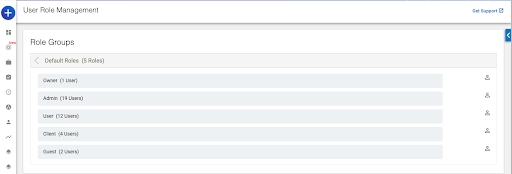
Go to the User role management page and select the default group.

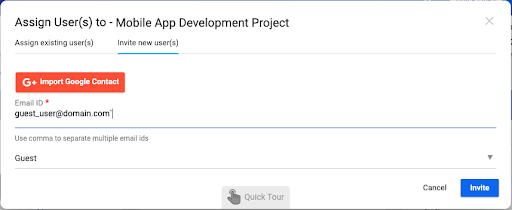
Invite Guest Users

On the user role dropdown, you just select “Guest” and submit the invitation. The invited user can join the Organgescrum using the invitation email link.

How to Restrict Access to Guest User

Guest users define themselves as limited access-based users. Still, in Orangescrum you can set access control on the User role management page.

You can find the Guest on the drop-down list. And click on the “Guest”.

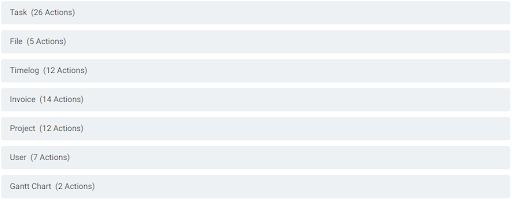
Then the action control drop-down menu will be visible under the Guest layer. The action controllers are Task Action, Timelog Action, File Action, Invoice Action, etc.

Now click on each action controller menu to see the detailed controller option.

Example: When you click on the Task Action controller menu, you can find the task management-related controller options; such as View, Manage, Delete, etc.

Users can easily select or de-select the controller option using the same menu.

As per the requirement, the admin can set or revoke the access to perform the guest user activities.

Spent hours column in task list page

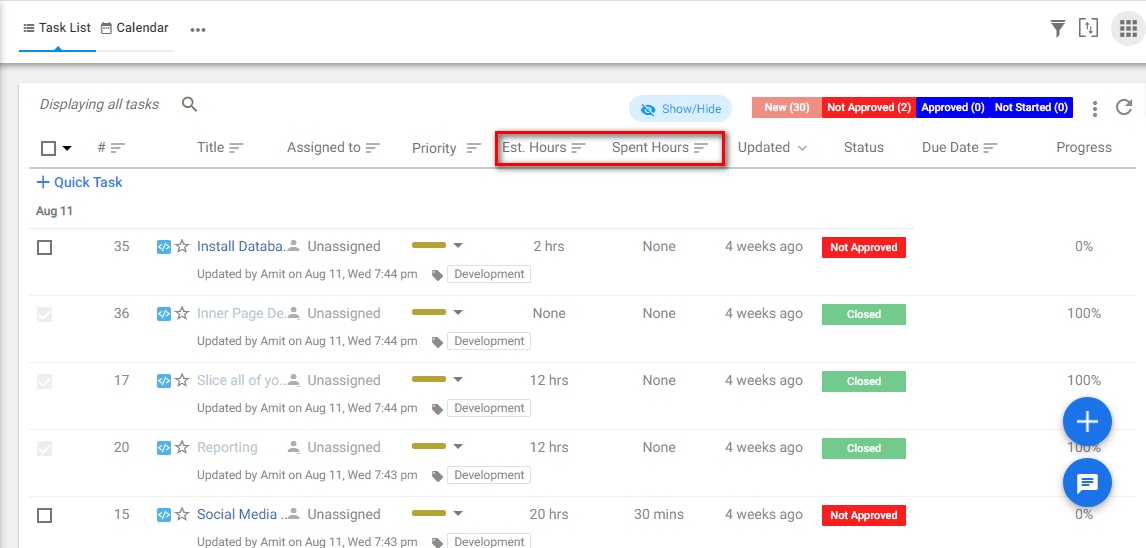
We also have added the spent hour column on the task details page. So the user can see the spent hours for each task.

Spent Hours

To enable this column, users must enable this feature by using the hide-show button.

Find more about the Guest User feature.


Friday, 3 September 2021

Best Asana Alternatives for Project Management in 2021

Project management software is the most required tool for every business. It helps businesses to collaborate, communicate and achieve their goals.

Many small and medium businesses are turning towards Project Management Tool.

In the present day, Asana is the most popular project and task management tool.

The asana tool holds easy to plan, monitor, and schedule features.

However, Asana is not always the right platform to use for every business. You can find much bigger and better project management tools that help the teamwork more effectively than Asana does.

What is a Project Management Tool?

Project management tools are used to assist the individual or team to organize and manage the task and project effectively.

With this tool, project managers or project owners can do proper planning, manage tasks, and set deadlines. It is an effective way to track work progress.

What are the necessary features for every Project management Tools?

What are the necessary features for every Project management Tools?

As many teams have started working remotely, the micromanage industrialized process doesn’t work for some businesses. Therefore the project management software becomes an effective tool for managing projects both remotely and at the workplace as well.

“Plans are only good intentions unless they immediately degenerate into hard work.” ~ Peter Drucker

Here is the list of all necessary features that are important for every project management software:

  • Task Management – Task feature is an important feature for every project management tool. With this feature, managers can add tasks and assign them to the team members.

  • Time Tracking – Every project management tool needs to have a time tracking feature. It helps the manager to identify the time spent by a team member on each task. It is an effective way of productivity.

“Time is what we want most, but what we use worst.” ~ William Penn

  • Project Templates – The template is a necessary feature for every project management tool. It helps you to plan effectively for your project.

  • Use-to-use – Every project management tool needs a user-friendly feature. As complicated features make the team more confused and create less productivity.

We may say, all these features are pretty much needful to be called “efficient project management software”. And these features are the key factors for using Project management Softwares.

What is Asana?

Asana is one of the popular tools for project management. It contains all the features that are easy to use.

It helps the team to organize their daily tasks and achieve goals. Your team can manage their entire task at a particular place.

However, Asana has its strengths and weaknesses. When you come to the features like budgeting, reporting, and invoicing.