Monday, 4 October 2021

Essential features of team management software - Orangescrum


Handling remote and in-house teams might be difficult. It becomes more difficult when you have to handle various projects at a single time. Any mistakes occurred by the team will bring project failure.

It will cause additional expenses, which results in unhappy clients and demotivated team members.

This software facilitates collaboration with the team. It also boosts the productivity of your team.

The Team Management Software or Project Management Software creates accountability that enables you to set the deadlines, scheduled tasks, and documents.

What is team management software?

Team Management Software helps in managing all the tasks of the project in a single dashboard. It provides you with a shared platform.

This shared platform facilitates project collaboration and gives project managers a high-level overview of where things stand.

This improves the collaboration and provides project managers with a view of the task progresses.

To keep your things moving in the right direction in your projects becomes easier and provides larger scopes.

If any mistakes occur, it will lead to extra budget and project delay. It will also create unhappy clients and executives.

The team members can collaborate through these tools for project delivery.

31% of business has observed that most of the work is completed due to team collaboration.

Why Must Organizations Use Team Management Software?

With spreadsheets you can create fancy charts but is it effective for your project? It is not a productive option for managing projects.

Therefore with effective team management software, you can develop team collaboration, track time and other benefits.

So here is the reason why you should use Team Management Software:

Accountability

As your team handles many projects, accountability plays a vital role in project development.

The team cannot perform well if they don’t understand their tasks and know the major parts.

With Team Management Tools you can get accountability of the project schedules, deadlines and organize documents.

The manager by using the Team Project management tools can pull the reports and analyze the team progress.

Visibility Increases

The project progress now doesn’t remain in the dark. You get to deliver more successful projects and within the budgets.

The whole team can view the goal of the project and the role each member plays in completing the project.

The team can view real-time updates about the tasks and the progress of the project.

More than 71% of professionals have observed they spend more time every week on unnecessary meetings but using the Team management software, they can directly collaborate from the board and keep the members in the loop.

The Must-have features in ideal team management software

Team Management Software provides lots of features that help to effectively handle your team with successful project completion.

However, some of the essential features of the team management tools are:

1. Easy to use

The team management tools or Project management tools are user-friendly.

Many team members often find it difficult to understand the tools, but using simple management tools like Orangescrum helps the team to understand each feature and manage the project easily.

2. Collaboration

With ideal project management tools, you can develop a platform between individuals and team contributors.

It provides the team members to collaborate and complete the task while staying on the same page.

3. Schedule

It is an important feature of team management tools. The project managers can schedule the project or tasks to each team member.

It helps the team members to identify what is necessary, that needs to be done.

Proper scheduling helps the team to meet the deadlines and the team remains motivated from the project beginning to the end.

4. Time Tracking

With management software, you can identify the time you spend on each task.

This provides more productivity to the team members. Your team can identify the activity that took more time.

5. Document Sharing

The team members can download, upload and share documents or sheets in real-time. This improves more collaboration and helps the project manager to make informed decisions that are based on actionable insights.

6. Budget Management

The budgets are the estimated costs required to complete the project. The budget is used to handle operating costs, equipment, labor cost, and more.

7. Real-Time Collaboration

As most of the team is working remotely, it creates difficulty to collaborate. The team management tools help to communicate and provide real-time updates on the task.

8. Third-Party Integration

As your work is spread out across various platforms. It allows the team members to go to and fro between several applications.

But with Team management tools you can enjoy all these features on a single platform.

9. Resource Management

Resource management features help to plan and manage the resources you need for project completion.

You can manage the resources efficiently, it ensures the project remains on schedule. It helps you to plan and allocate resources based on your team capacity.

10. Project View

Your team can view the project in a single timeline. It helps to view the work progress and the remaining task needs to be done.

Using management software you will get a clear idea about the budget needs for a project.

You will get a real-time update on cost and help you to identify if you are under costs.

Why should you use Orangescrum?

As Project managers have to deal with lots of things, therefore they go for the right team collaboration tools that help to manage the team and project.

Orangescrum has been the most effective and flexible tool to work with. You can view your project deadlines, tasks, and work progress from planning to execution.

Orangescrum Project Management Software provides all the project details in a single timeline, assigned members, and document sharing.

You can add feedback or comment on particular tasks.

If you are searching for an effective tool that helps you to collaborate and manage your team without putting in the extra effort then go for Orangescrum for many benefits.

FAQ:

What is Team Management Software?

Team Management Software is a platform that helps the team to communicate, collaborate, and effectively manage the other team members and other tasks.

It helps you to effectively manage your project that helps in successfully completing the project before deadlines.

What are the 5 essential features of Team Management?

Team Management provides you with many features. But some of the essential features of Team Management Tools are:

  • It helps you to track the time spent in each task

  • The team can share the documents on a single platform

  • It helps to schedule the task

  • The team can effectively collaborate

  • It is easy to use tools with many features that help to easily manage your project

Name 5 best Team management Tools for your Team?

The 5 best team management tools you can use for your team are:

  • Orangescrum

  • Microsoft Project

  • Proofhub

  • Teamweek

  • Liquidplanner

How does a Team Management Tool Work?

A team management tool is an application that helps the team to collaborate, manage, and communicate.

It helps the team to gain more productivity and improve the quality of the task produced by the team.

Conclusion

Task Management Software improves the team’s productivity and efficiency. It is a tool for all your needs. The teams always look for effective and time-consuming methods to successfully deliver the projects.

But it is important to choose the right tools that help the team in getting an optimum outcome. With these features, you can collaborate, handle and manage your project.

Main Article Source: 10 Essential Feature of Team Management Software


Friday, 1 October 2021

Critical Path in Project Management – Definition, Method

 After putting a lot of effort into project planning, suddenly you observed that one of your tasks took much longer than expected and during that time a new assignment pop-up.

Also, in such a situation one of the important team members took leave for a few days.

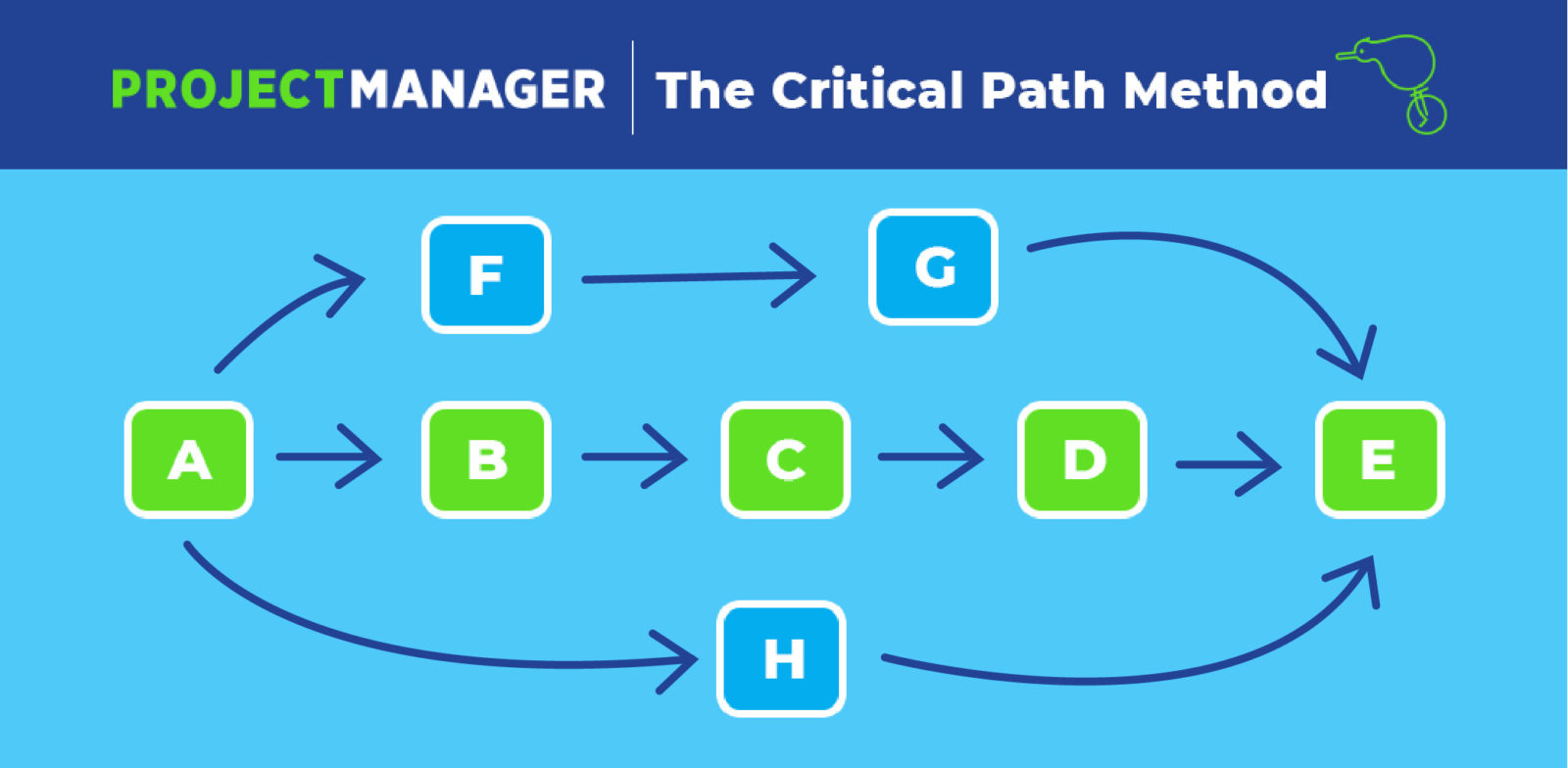
the critical path methodSource: Projectmanager

But you shouldn’t let those events frustrate you, with the Critical Path analysis you can address all these issues.

A project without a critical path is like a ship without a rudder.” — D. Meyer, Illinois Construction Law

If something comes in the team’s way, you can look for the alterations without causing any delay in the milestones or missing any deadlines.

What is a critical path in Project Management?

A critical analysis is a method of project management.

It creates the shortest timeline for your project, looking at the tasks needed to complete the deliverables, along with the estimated time needed for each step, dependency of the task, and the final milestones.

It is a methodology planned to handle your project in an intelligent way.

With a Critical path, you get the idea about the tasks which can be a reason for the project fall.

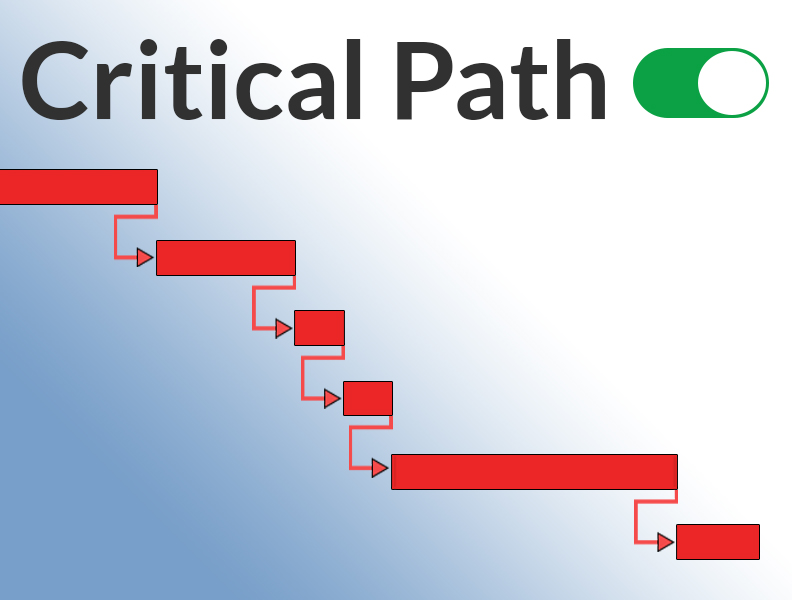
show-critical-path-featuredSource: Planacademy

It will show you the timeline of the Gantt chart, and the task in the critical path turns red. The tasks that are not on the critical path remain in their original color.

No matter how good the team or how efficient the methodology, if we’re not solving the right problem, the project fails.” – Woody Williams

How do you find the Critical Path?

It’s time to find the critical path in your projects, but how?

To help you identify the critical path in your projects here is a step by step description:

1. Outline the Project scope

As you start finding your critical path, you need to break down what’s involved in the projects.

Breakdown the project structure into:

  • Identify the task: Figure out the details of the project, have a discussion with the stakeholders, and identify the tasks that are necessary for the project.

  • Put the task in order: As you get the idea about the task that needs to be included in the project. The next thing you need to do is put them in order. This will help to identify the dependent task.

  • Duration for task: To find out the critical path in your project, you need to figure a duration for each task. This will help to identify the longest path.

2. Identify the potential path

After identifying the project scope, it’s time to know the paths and strings. A project holds many connected and dependency tasks. So you need to identify these tasks.

It might look like a lot of work to be done.

But it can be done easily with Project Management Tools like “Orangescrum”.

3. Identify the critical path

To find out the critical path, you need to identify the task with the longest sequence. The longest sequence in your project management is the critical path in your project.

Can the Critical Path change During the Project?

A project has many series of interrelated tasks. The team tries to complete the tasks, so as to reduce the stress of critical paths.

The development in the project reduces the critical path in a task or it might bring a new critical path in your task. So, the critical path in the task changes with the development of the projects.

Know more about The Critical Path in Project Management


Wednesday, 29 September 2021

New Product Update - Project Budget and Cost in Orangescrum


Hello, Orangescrum’ers! It’s update time! Now get a clear picture of your project cost within Orangescrum.

With this release, project managers can view project budgets and costs for all your projects. Not only this, but also you can define a role-based hourly rate for your resources.

We are committed to making our product more valuable to customers.

At Orangescrum, we always want to provide the best solution for our customers, so we have created the solution you want to ensure your successful support for the product.

We sincerely thank everyone who contributed by presenting and sharing their views before developing this feature.

Expressing the core values with more clarity and simplicity are the keys to our success.

Recently, we released the Guest user, Custom fields, Timesheet update, Resource Skill Set, and this time we are back with “Budget & Cost”.

What’s New: Budget and Cost

Orangescrum’s Budgeting feature gives a clear picture of whether you’re completing your projects within the budget and how much you’re making profits for your projects.

It includes

  • Setting up the budget for the project

  • Define the approved cost

  • Define hourly rate

Add Budget Cost

The Benefits of Budget and Cost

Budget and Cost give you access to important metrics that are not accessible in traditional project management tools.

This is essential for any company looking to increase the efficiency of their workflow and ensuring they’re getting maximum ROI on their projects.

Budget and Cost also allow you to forecast your project’s profitability, which will make it easier to make the right business decisions.

  • It helps us to specify the cost and keep transparency.

  • It makes the projects’ profitability starting from the planning phase and through the execution.

How to Define Budget and Cost in Orangescrum:

Cost management is a discipline that evaluates the cost of delivering on the product promises made to customers and communicates this information to various stakeholders.

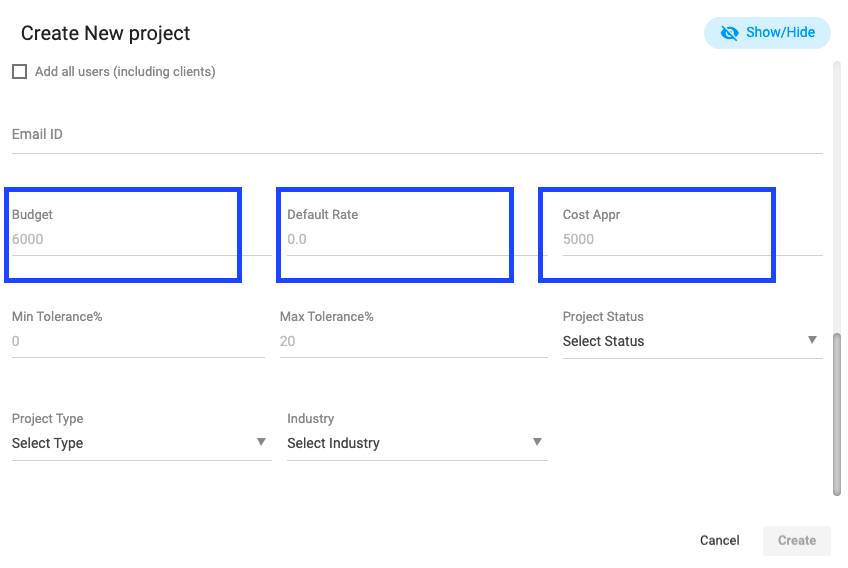
To define the budget & cost the user needs to add the cost value at the time of creating a new project.

  • Click on the create project

  • Scroll down and put the Budget amount

  • Default hourly rate

  • Cost Approve value

User Note

Default hourly rate: When a resource will log to the same project or associated task, the Default hourly rate will be added to the billing.

Cost Approve value: If you’re working on a fixed bid project then you can mention the cost approved, so you can know what is the profit when your project gets over.

Add Role-Based Billing Rate

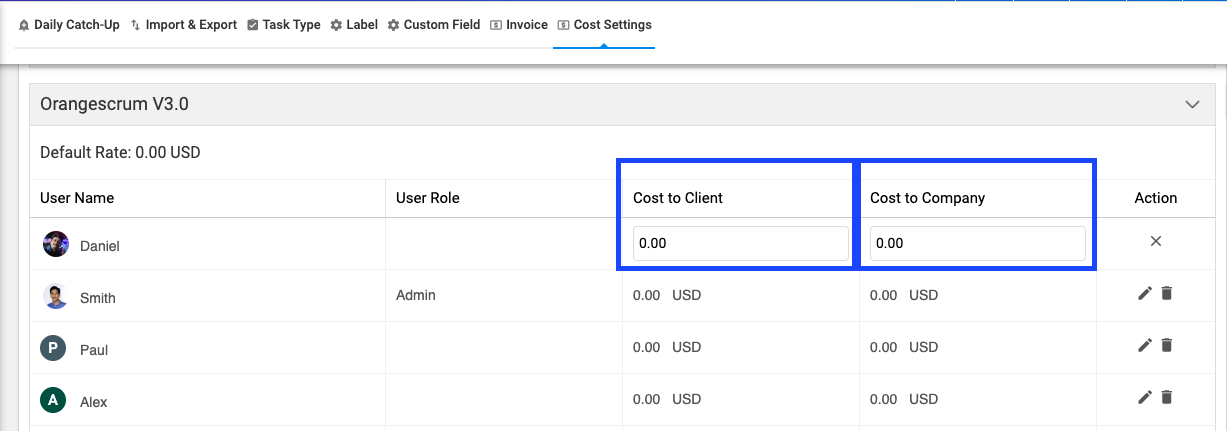
You can define the role-based billing rate for different resources for any project. To make this setup, go to the “Project Setting” and click on “Cost Setting”.

Cost Setting

You can select the user role and then define the cost to company, the cost to client.

Add Role-Based Billing Rate

User Note:

Cost to Company: How much you’re paying to your resources in hourly rate

Cost to the client: How much you’re billing or charing your customer in the hourly rate

Budget & Cost Report

When the resources start log time or submit the timesheet with billable hours, the cost value will be added to the Project cost report.

You can find two cost reports within Orangescrum. Project Cost Report and Resource Cost Report.

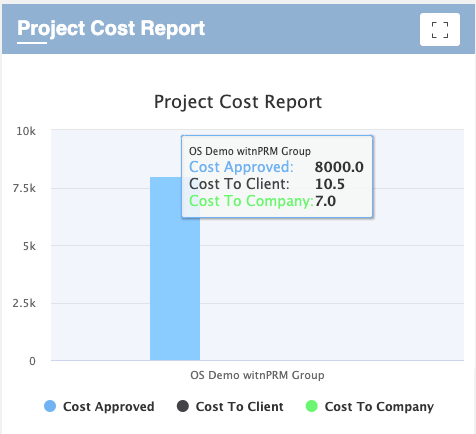
Project Cost Report –  You can find the project cost report on your organizational dashboard page and in-side any individual project overview page. In Dashboard, you can find the Budget & Cost report (that includes Approved Cost, Cost to Client, and Cost to Company) of all projects under your organization.

On the Project Overview page, you can find the Budget & Report for that particular project.

Project Cost Report - Project Overview Page

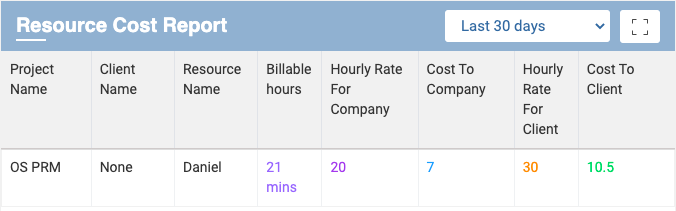
Resource Cost Report –  As like Project Cost Report, you can find the Resource Cost Report at on your organizational dashboard page and in-side any individual project overview page.

In Dashboard, you can find the Resource Cost Report for your all projects that includes the value of Resource-wise billable hours, Hourly Rate for Company, Cost to Company, Hourly Rate for Clients, and Cost to Client reports for each project.

Resource Cost Report - Dashboard

On Project Overview Page,  you can find the Resource Cost Report for that particular project. The reporting value includes Resource Name, Billable Hours, Hourly Rate for Company, Cost to Company, Hourly Rate for Clients, and Cost to Client.

Resource Cost Report - Project Overview Page

User Note

Users can export this report as well. The report can be export in CSV.

Coming Soon

The “Profitability Report” would be the next release for our users.

Get blogs related to Project & Team management in your inbox

Join 20,000+ others who get our weekly newsletter with insider project management tips! This report will show you how much you have spent vs how much you billed, by this comparison we will show the profitable report for each and every project.

Takeaways:

Budget and Cost provides a way to forecast finances, track project performance, and identify savings opportunities.

You can’t keep a project on track without knowing your costs and the cost of materials. Budget and Cost is the only tool that gives you this information in one place.

Please let us know if we can assist you in your mission to successfully deploy Orangescrum in your company.

Main Article Source: Product Update: Budget and Cost for Project - Orangescrum