Monday, 1 November 2021

Best Zapier Integrations to Increase Business Productivity


Hello Orangescrummers, here is the latest update for you. We have released Zapier Integration (Beta) for Orangescrum. Now get the benefits of flawless workflow within Orangescrum and other applications.

We know you’ve been waiting for this Zapier integration that we’ve had on our development pipeline for the least period of time. It’s finally here!

We’ve been working hard to offer the best service possible, and it’s working! We’ve had so many great customers who have supported us in our journey.

We’ve been listening to your feedback and we have a few new updates that will make Orangescrum even better!

These will be to make Orangescrum more convenient and bring you more simplicity in your project progresses.

Let’s get started on the integration process!

How To Make The Integration?

Before we get started, there are a few things we must know about Orangescrum and Zapier Integration.

You might want to know what kind of authentication Orangescrum uses?

Yes, Orangescrum uses API Key Authentication.

1. Create Zap

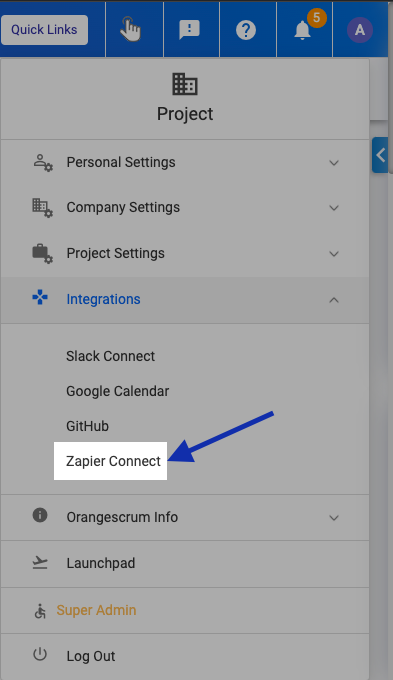
To create your Zap, you need to login into the Orangescrum dashboard and go to the Integration section on the right sidebar menu panel. And click on Zapier Connect.

Enable Zapier in Orangescrum

You will be redirected to the Zapier Integration Page to generate the Integration API key.

Zapier Integration Page

Once you hit the “Generate Key” button a unique API key will be generated and will be shown.

Generate API Key

Now move to the Zapier website. 

User Note: You must have registered to Zapier using the same email ID as you have registered with Orangescrum.

Go to the Zaps tab on the Left menu at your Zapier profile and click on “Make a New Zap”.

Read Full Blog at Product Update: Zapier Integration for Orangescrum Released- Orangescrum Blog


Tuesday, 26 October 2021

Coming soon - Build a Zapier integration on Orangescrum


Hello Orangescrummers! We are just one step away from our mega release. Yes, we have made the final push to make the Zapier Integration available for our users.

We’ve been working hard to offer the best service possible, and have been very lucky to have such great customers who have been so supportive.

We’ve got some new updates coming your way! And each of these updates is to make Orangescrum more convenient and bring more simplicity to your project.

Zapier integration is the most awaited and on-demand feature that has been our development pipeline for the least period of time.

Before we make the final release, here we are sharing the beneficial usage of Zapier.

What Is Zapier

Zapier is a simple automation app that connects thousands of apps, so you can automate your business without writing a single line of code.

With Zapier, you can connect over 1,300 business tools without having to have any coding knowledge. In just a few clicks, you can integrate two applications that work together.

With the help of this versatile, flexible, and easy-to-use software, you can boost the efficiency of your business in no time!

Why Use Zapier

How would you like to cut your manual work in half or completely eliminate it? That’s what an automated workflow can do for you.

Zapier is an application that integrates with thousands of other apps. So, you can easily connect your favorite tools to your Orangescrum account!

Automation means your business is going to run so much more smoothly. But what does it mean, and how will it affect you?

The Benefits Of Using Zapier

You can automate your day-to-day processes to save time and boost efficiency with the Zapier app.

You just need to set up a workflow once and it will continue to work as long as you need it.

And if you change software platforms, you can create a new Zap and still track your information.

By using the Zapier application you can:

  • Save your time

  • Scale your business

  • Streamline your onboarding

  • Automate your business process

  • and many more

Zapier And Orangescrum

Zapier is an action automation cloud tool that can help you streamline your work by allowing you to create customizable actions or zaps.

It’s a way of freeing yourself from manual data input and taking advantage of the Zapier platform.
Zapier-Orangescrum

In other words, you can integrate Orangescrum with any other app or service that supports Zapier for a faster workflow.

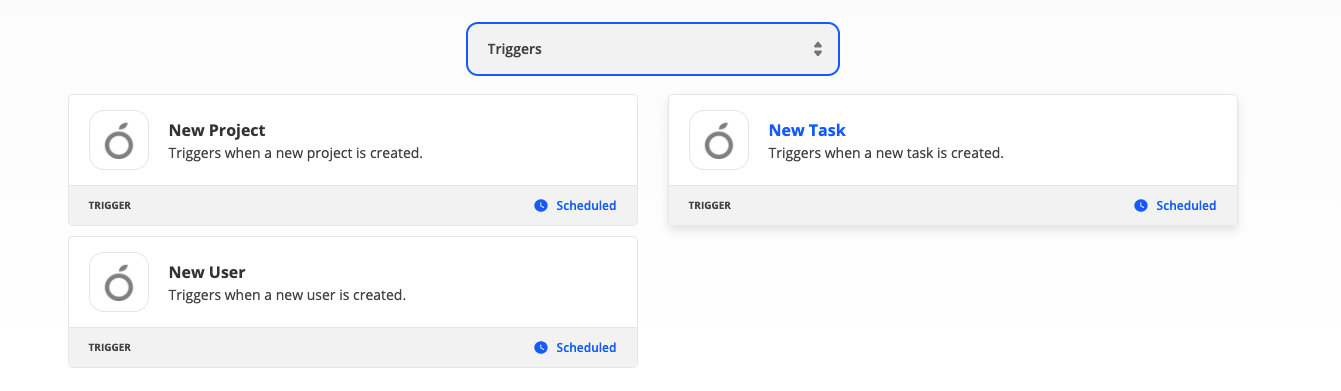
With our first release, we have planned to release three supported triggers and actions each for this integration module.

Trigger Zaps:
Trigger Zap

Create New Project – By using this zap, users can create a new project within the connected application from Orangescrum.

Create new Task – By using this zap, users can create new tasks within the connected application underneath a selected project from Orangescrum.

Invite Users – By using this zap, users can invite users to join the connected application from Orangescrum.

Action Zap:

Action-Zap

Create New Project – By using this zap, users can create a new project within Orangeswcrum from the connected application.

Create new Task – By using this zap, users can create new tasks within Orangeswcrum from the connected application underneath a selected project

Invite Users –  By using this zap, users can invite users to join Orangescrum from the connected application.

And with the time being, we will release more Zaps in this integration module.

What’s More

Beyond the Zapier integration release other two more product updates are in our pipeline.

GitHub Integration

GitHub-Integration

The new integration feature will be available in Orangescrum. With it, you can view your development code repositories, branches, code pull-push requests, and the status of each one under a task.

SSO Integration

SSO Integration

Now, you can enjoy the modern digital experience of seamless SSO. That means no more logging in and out, so you can focus on what matters most!

Conclusion

We’re as excited as you are about the Zapier integration in Orangescrum, and we can’t wait to see how it goes.

So, let’s hope for the best and cheers until it arrives.


Blog Source: Coming Soon: Zapier Integration in Orangescrum


Thursday, 21 October 2021

New Release: Bug and Issue Tracking Reports


Hello Orangescrummers! Recently we have released the Bug & Issue tracking feature underneath our product release. And this has been the center of attention for our tool since its release.

Many customers have come up with various comments and the overall response is encouraging for us.

Anyhow, this time we have come with another update underneath the Bug & Tracking feature. The “Bug Reporting”.

Let’s have a look at it in detail.

Update: Bug Reporting

On our previous release note, we have shown how you can add bug details, and how you can monitor the progress.

Now we have added a dedicated Bug Report dashboard that shows the bugs and their status.

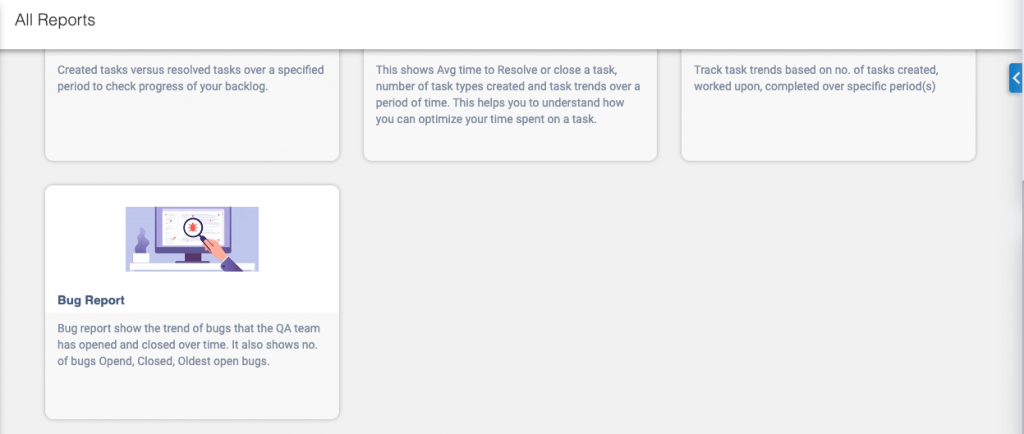
To find this Bug report, go to the “Task Analysis Reports” section under the “All Report” (Report) page.

Find All Report

We have divided the reporting view into 3 sections.

  • Bug Trend Chart

  • Bug Status chart

  • Bug Severity

All these sections provide the real-time analytical data of any selected project.

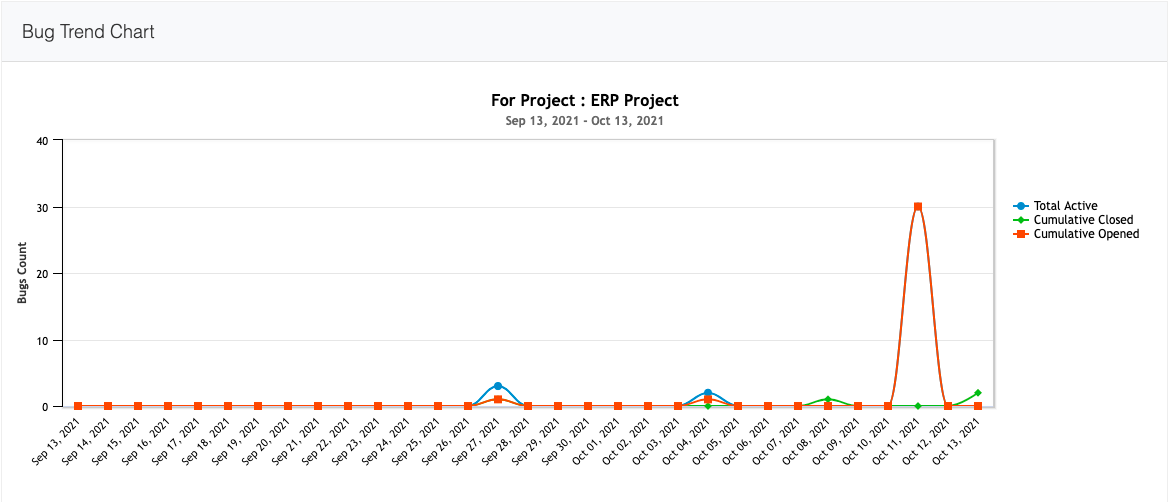
Bug Trend Chart

Bug Trend Chart

This section provides the daily-wise report stats for cumulative Opened Bugs, cumulative Closed Bugs, Total active bug trends.

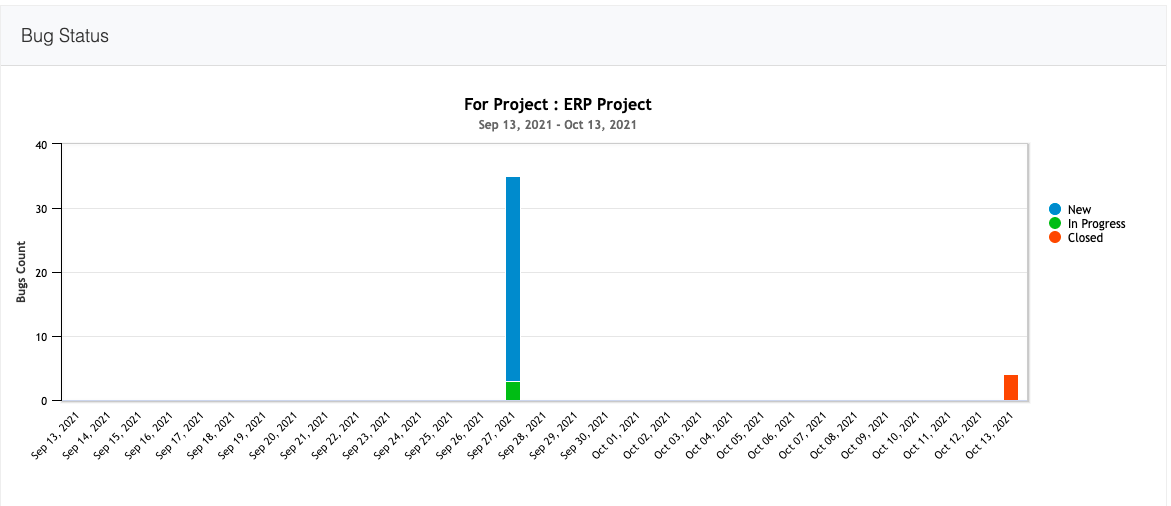
Bug Status Chart

Bug Status

Users can view the total number of New Bug, In-Progres, and Closed bug values on respective dates.

Once the team resolves any new bugs, the total new bug value will be reduced instantly.

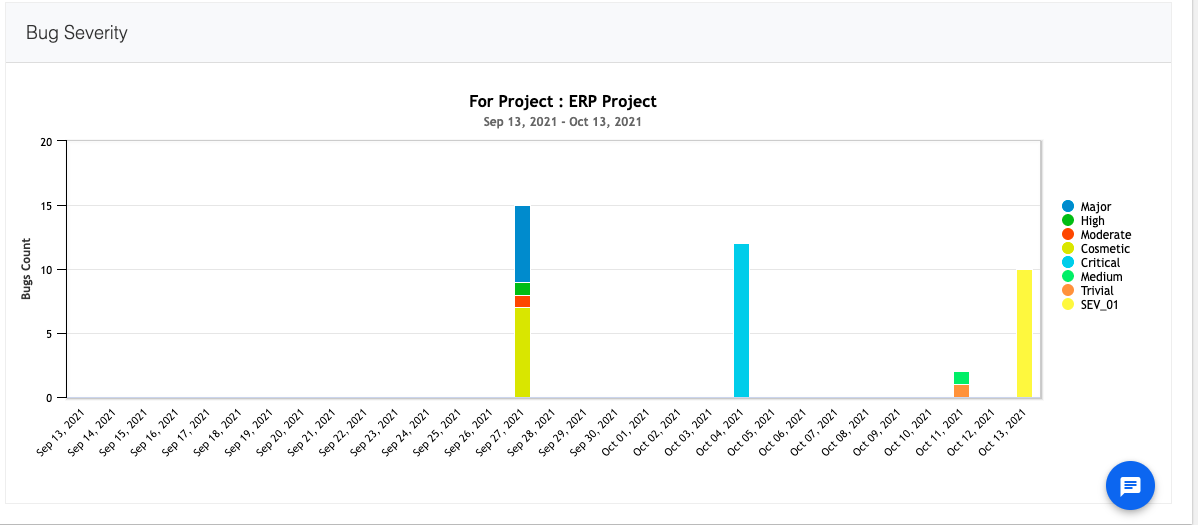
Bug Severity

Bug Severity

This section provides the bug severity values. In case of a bunch of new bugs added to the bug management system, this section categorizes the bug severity values. So, you can set priority to act against each bug.

Orangescrum offers a free two-week trial, so what are you waiting for? Upgrade your bug reporting and give it a go!

Read Full Blog at What’s New: Bug & Issue Reports Released - Orangescrum Blog


Monday, 18 October 2021

Product Update: Bug & Issue Tracking


Hello Orangescrummers! As per our commitment here we come with our latest product update. However, we have released the Bug & Issue Tracking feature.

Orangescrum is continuously bringing new updates that make it easier for you to manage your projects. We’ve got some major ones for you this time!

We’re always working on new updates to make Orangescrum even more convenient and bring you a great user experience. In our last update, we released the Profitability Report. And this time, we have some major updates for you!

Product Update: Bug & Issue Tracking

A bug is often a piece of code that does not work as expected. It may be that a feature or a specification supposed to enable a certain functionality has been coded incorrectly.

As a software engineer, it is your responsibility to identify and document these bugs so that they can be fixed and quality products can be delivered.

Bug tracking is one of the important aspects of a software development lifecycle to deliver quality products.

So, Having a robust defect management process improves the quality of software, which in turn improves the sustainability of the organization.

It also helps you to stay ahead of your competition, so you can book higher profits.

With Orangescrum Bug & Issue Tracking feature you can add every detail at your ongoing development projects.

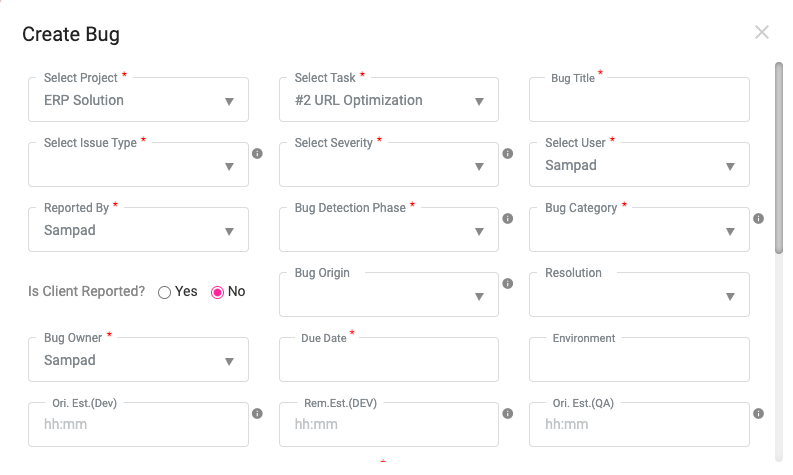
To add bug details, just click on Bug Tracking at the left menu at Orangescrum. And click on “Create Bug”.

Bug Details

Bug Details

A Guide to Create a Bug Details in Orangescrum

  1. Select Project – Select the project from the drop-down where you found the bug.

  2. Select Task – Select the related task of that project at where you found the bug.

  3. Bug Name – Name your Bug.

  4. Select the Bug-type – The founded issue can be a bug, or a required improvement, or might be a query. So add your bug type accordingly.

  5. Select Bug Severity – Select the Bug Severity.

  6. Reported by – Select the user who has reported the bug.

  7. Bug Detection Phase – In case the task is in the development phase or in the designing phase, Add the bug detection phase accordingly.

  8. Bug Category – Select the Bug Category.

  9. Select Client – Select if the Client has reported this bug or not.

  10. The Bug Origin – Put the origin of this bug, as it could be from Designing origin, or Development origin, etc.

  11. Resolution – Users need to add the required resolution for the bug.

  12. Bug Owner – You can select a user as bug owner where the selected user is able to monitor all bug handling activities.

  13. Due Date – Add the estimated due date to resolve the bug issue.

  14. Environment – Select the bug environment like operating system, browser, device, etc.

  15. Impacted Area – Add the details where the found bug has made the maximum impact.

  16. Description – Add the detailed bug information to the description field.

  17. Attachment – Add the bug-related attachments.

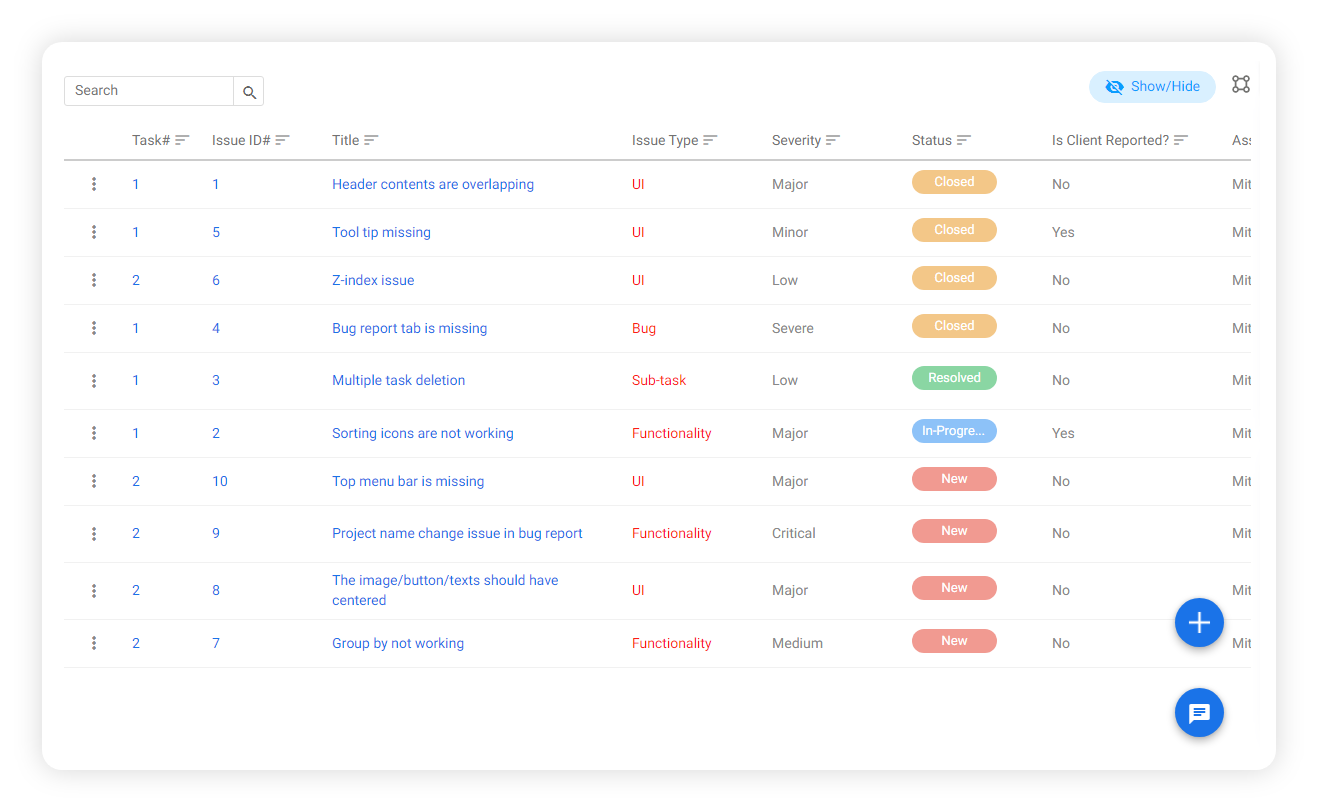
The Bug List Page:

Here the user can able to find the Detected Bug List as it shows bug name, Issue type, the bug severity, and the Status (Closed, In-Progress or Yet to start).

So the user would have a clear view of bug status for all projects with a single dashboard.

Bug Listing Page

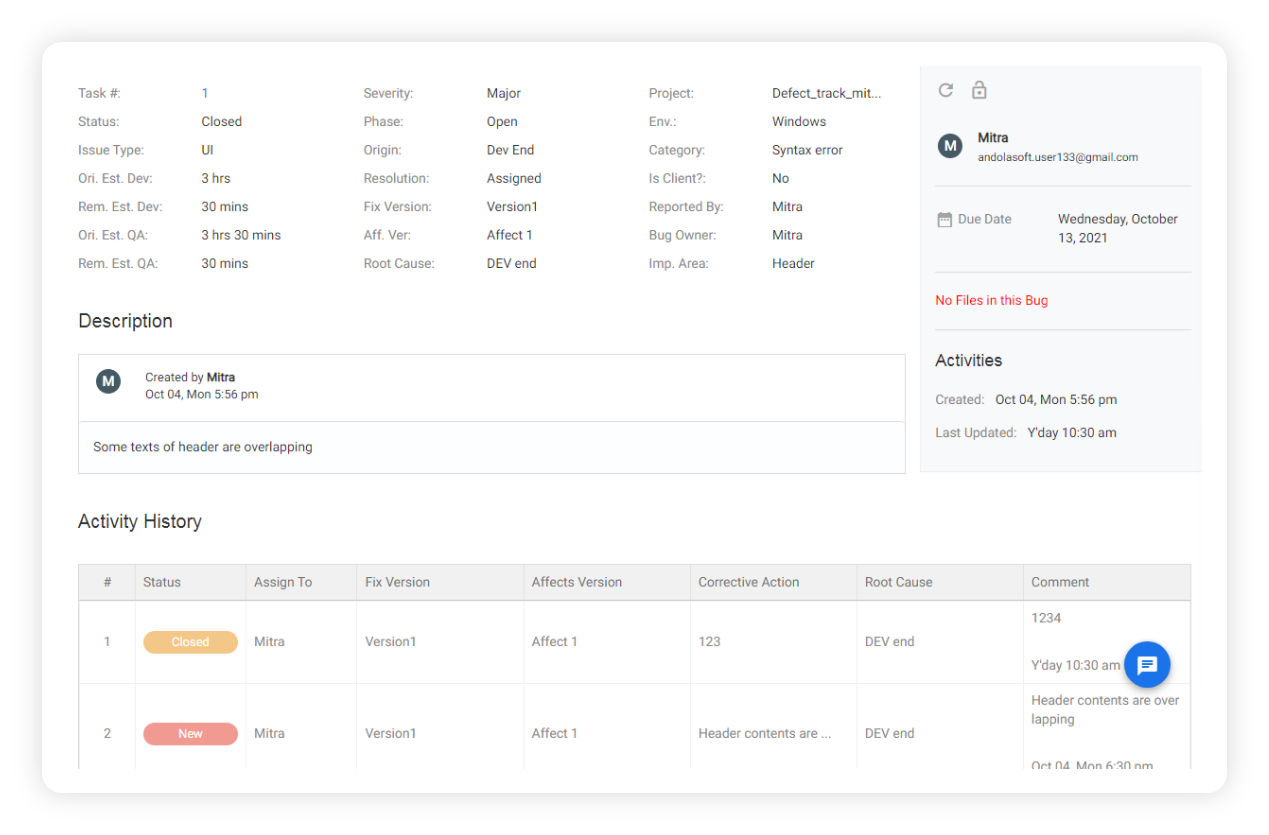
The Bug Details Page

On the bug detail page, the users are able to see all related information added to the bug.

task detail pageAlong with the bug details, the user can also find the bug handling activities in the Activity History section.

Bug List In Task Detail Page

Users can also see the bug list on the associated bug listing page.

task details


The bug list can be found under the “Bugs” tab on the task detail page. Users can see the bug status as well as create new bugs on this page also.

Let’s Come To The Field Customization Part

As we mentioned before, you can customize the bug details fields for hassle-free monitoring.

Just go to the Bug Management page under the project setting at the right top menu.

bug management

Here you can find the fields to customize options at each tab.

You can create new fields and enable them and delete them instantly.

User Note: You can not delete any fields if they are in any Bug Details.

Coming Soon

1. Zapier Integration

Zapier Integration

Zapier integration will let you connect to other applications so you can share your project task information based on when something happens.

2. GitHub Integration

GitHub-Integration

Github Integration feature is already available in Orangescrum. With a new enhancement now you can see your development code repositories, branches, code pull-push request, and their status under a task.

3. SSO Integration

SSO integration will be another authentication experience for Orangescrum users. Users now can enjoy a modern digital experience as repeated logins are no longer required.

Conclusion

Bug tracking can be used in each and every stage of the development process, thus helping developers to be constant, be highly productive.

Adequate bug tracking processes safeguard the interests of the parties involved and increase the likelihood that the project will meet the scope established in the agreement.

In the end, you deliver what was exactly requested. Customers receive what they exactly wanted and both of these happen ON-TIME and WITHIN BUDGET!

Blog Source: Bug & Issue Tracking Released within Orangescrum