Showing posts with label GitHub integration. Show all posts

Tuesday, 16 November 2021

Product Update: GitHub Integration 2.0 Released!

Hello Orangescrummers! We’ve come up with GitHub Integration that allows you to connect your projects in Orangescrum to your GitHub repositories with the all-new two ways sync (Orangescrum to GitHub and Vice Versa).

Integrating Orangescrum to GitHub will help users to see repositories,  branches, commits, and pull requests within Orangescrum task details. 

So, users do not need to switch the context which helps in reducing time and effort.

Now the IT and product development team can instantly create, collaborate, monitor, and manage all your GitHub issues directly from Orangescrum.

What Is GitHub?

GitHub is a cloud-based hosting service for Git repositories. It is a database for developers and programmers to collectively work on code.

It makes it easier for the individual and team to use Git for version control and provide collaboration features such as task management, bug tracking, and feature request for every project.

Why Is Git So Important?

“Git” implies the version control system; a tool that allows developers to keep track of the constant revisions to their code.

The “Hub” is the community of like-minded individuals who participate.

There are also many other things Git does well:

  • it allows us to revert changes

  • create new branches for adding new features

  • resolve to merge conflicts code at the same time to the same project

Key Benefits Of Using GitHub:

With GitHub integration, you can enjoy the below benefits

1. Documentation

By using GitHub, you make it easier to get excellent documentation. Their help section and guides have articles for nearly any topic related to git that you can think of.

2. Showcase Your Work

GitHub is also the best tool to attract recruiters. Today, when searching for recruits for their project, most companies look into GitHub profiles.

If your profile is available, you will have a higher chance of being recruited even if you are not from a great university or college.

3. Markdown

Markdown allows you to use a simple text editor to write formatted documents.

GitHub has revolutionized writing by channeling everything through Markdown: from the issue tracker, user comments, everything.

With so many other programming languages to learn for setting up projects, it’s a big benefit to have your content inputted in a format without having to learn yet another system.

4. GitHub Is A Repository

GitHub is a repository that means it allows your work to get out there in front of the team. Moreover, GitHub is one of the largest coding communities around right now, so it’s wide exposure for your project.

5. Track Changes In Your Code Across Versions

When multiple people collaborate on a project, it’s hard to keep track of who changed what, when, and where those files are stored.

GitHub takes care of this problem by keeping track of all the changes that have been pushed to the repository.

Why Do You Need GitHub?

Some of the Key Features of Github include:

1. Easy Project Management:

GitHub is a platform for project managers and developers to collaborate, track, and update their work to keep projects transparent and on track. Thus, providing easy and efficient Project Management.

2. Easy Code Hosting:

GitHub enables you to put the code and documentation in one place.

Moreover, in GitHub, there are millions of repositories, each with its unique tools for hosting and releasing code. Thus, users can easily host their codes in GitHub.

3. Effective Team Management:

GitHub makes it easy for everyone on your team to stay organized. Moderation tools like Issue and Pull Request Locking assist the team in focusing on the code.

4. Increased Code Safety:

GitHub employs specialized technologies to find and evaluate code flaws that conventional tools are prone to overlook. Thus, increasing Code Safety and helping developers to write efficient codes.

Let’s See How GitHub Integration Works On Orangescrum

Integrating GitHub with Orangescrum will make it much easier for your teams to collaborate on projects. Below is the process to get you started with GitHub integration:

Read Full Blog at Product Update: GitHub Integration 2.0 Released! for Orangescrum - Orangescrum Blog


Monday, 8 November 2021

What’s New: Task Due Date, Active Guest Users, and More Enhancements Released


Hello Orangescrummers! Right after making Zapier Integration enabled within Orangescrum, we are releasing some enhancements updated to make our product more efficient.

We are very happy to announce that our customers are the best thing that has ever happened to us. We have been very cognizant of their needs and what would be best for them.

We’re always updating our project management software to improve your experience and bring even more simplicity to your project. This time, we have some major updates for you!

The following updates are all focused on making Orangescrum more convenient and bringing more simplicity to your project.

List of Updates:

  • Task Due Date

  • Active Guest Users

  • Kanban View Status Update

  • Subtask View Enhancement

  • Time Log Status at Task Detail Page

Task Due Date:

Every task must have a due date. And we always try to complete the task within the due date. But sometimes the due date keeps changing due to various reasons.

It might be due to dependency on other resources, resource unavailability, changing of the plan, or could be any other reason.

It makes sense if the due date changed from the stakeholder’s end. But, when it changes from the end of the executions, it certainly needs an explanation.

Through this update, now you are able to know the reasons behind the change of the actual due date.

Let’s start, how to add the due date to the task.

Add Due Date

Users just need to put the date in the due date form at the time of task creation. And the due date will be reflected on the task details page.

Now for some reason, the user wants to change the due date of this particular task and he/she can do it from 3 different view pages.

  • Task List Page

  • Task Details Page

  • By Editing the Task

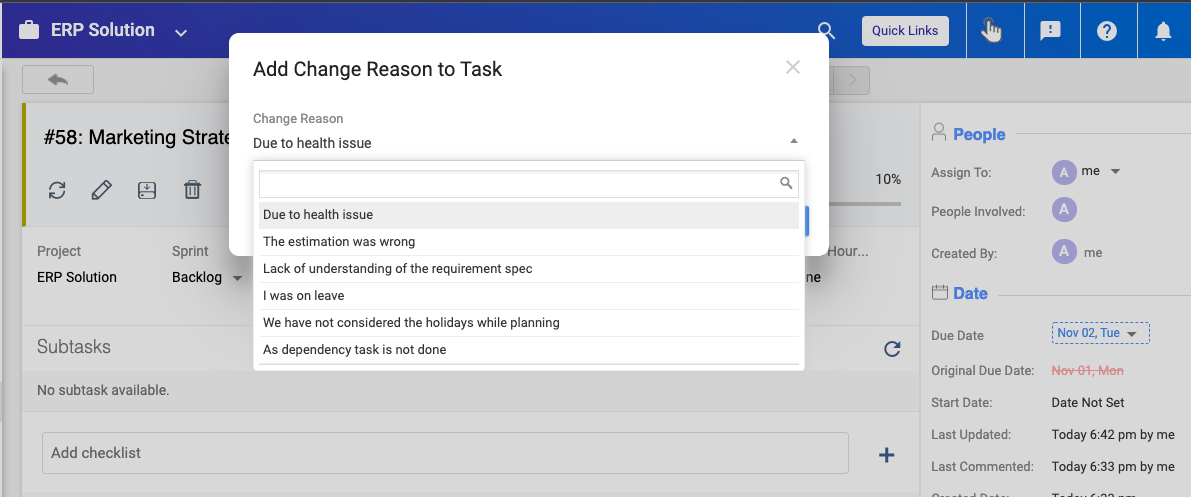
Once you change the due date, you will be asked to put the reasons to make such a change with a popup.

Add Reasons

You need to put the reason in the form or you can choose the reason from the drop-down and save it.

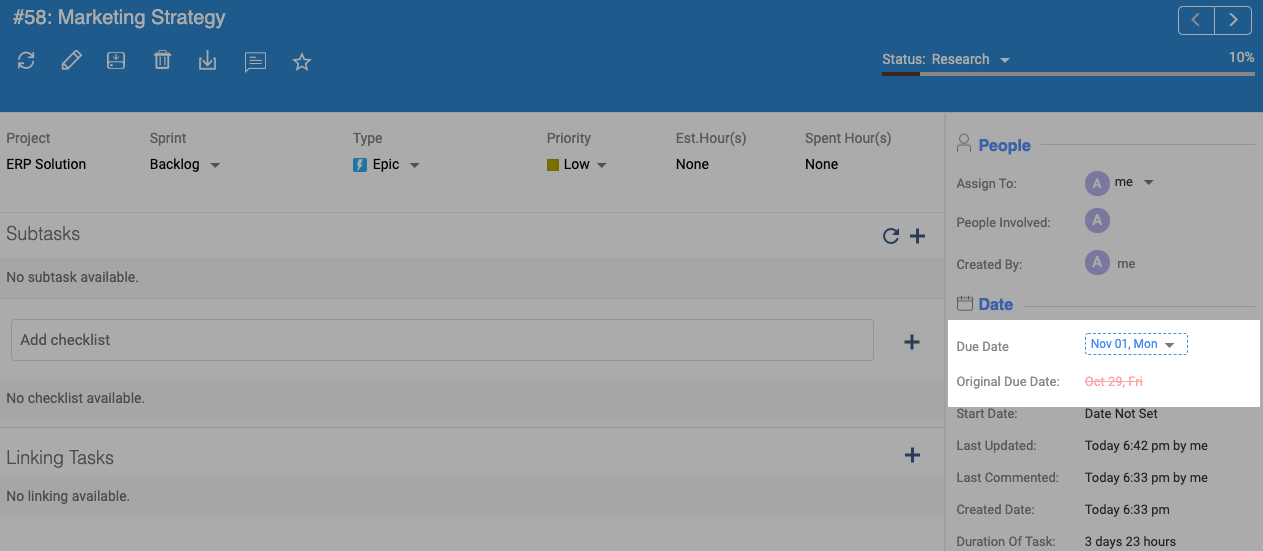
The new due date will be shown on the task details page. Along with the actual due date for this task.

Due Date View

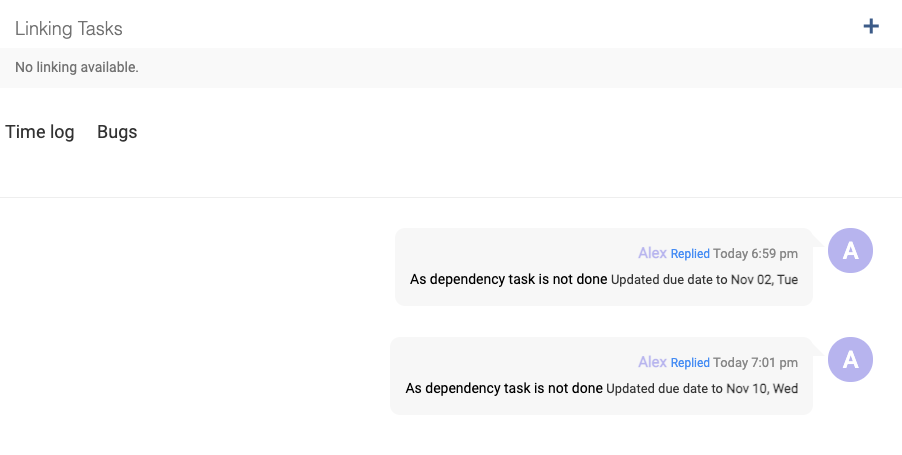
And each time anyone makes the changes, the details will be listed in the comment section on the task details page. Details are:

  • Who made the changes

  • What is the new due date

  • In which time the changes are made

  • What is the reason to make the change

Due Date Modification Details

The Reasons are Pre-added?

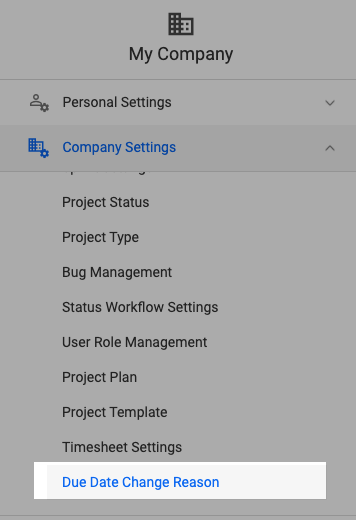
No, the reason shown on the drop-down is not pre-added. You can add these at the “Due Date Change Reasons” page under “Company Settings”.

Due Date Setup

You can add some of the common reasons on this page as well as you can disable some of the reasons from the list. Technically it works like a template. 

At the time of submitting the reasons, if you would not find any appropriate reasons from the list, you also can write a new reason and save them. That reason template will be listed at the this “Due Date Change Reasons”

Use Case:

At the time of changing the due dates, you will not be asked to add any reason if your account belongs to the Default User Role Group under your company.

The Default User Role Group:

  • Owner

  • Admin

  • User

  • Clients

  • Guest

Excepting the Default user group user, the others will be asked to add the reason to make the due date change.

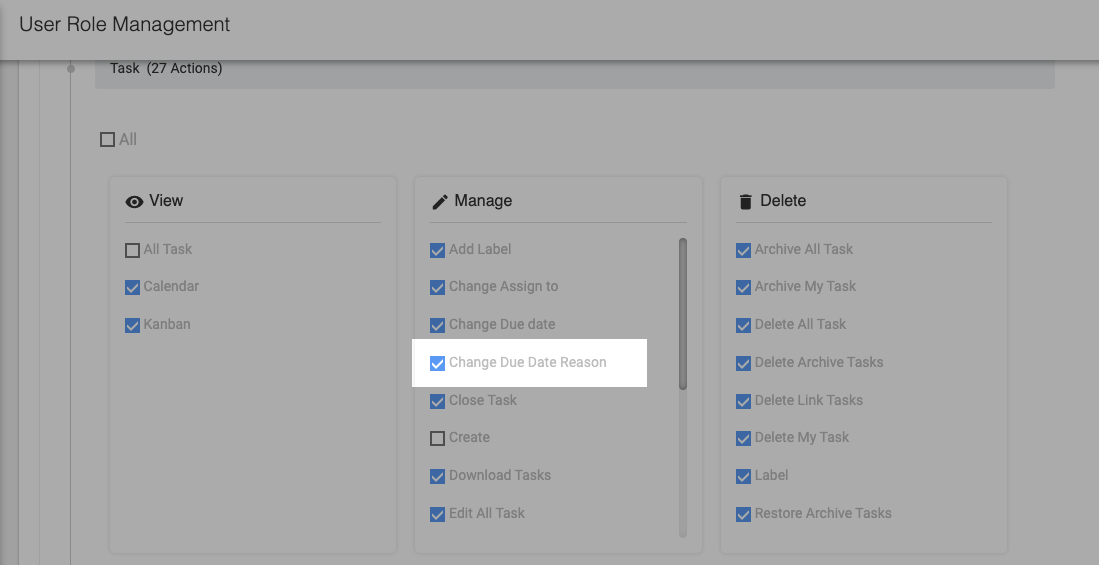
You also need to enable the Change Due Date Reasons at the User Role Management page for a particular user group. 

Enable Due Date

Active Guest Users:

In the recent past, we had released Guest User access so, you have been able to invite guest users to your projects and share the overall progress status with these guest users.

And this was a subscription-based feature. If you are running with a 10 users subscription plan, you can invite 5 guest users whereas if you are running with a 20 users plan you can have 10 guest users for you.

But previously we had limited guest user access for any organization. 

This means, when you create 5 guest users under your organization (with 10 users subscription plan), you were not able to add new guest users after disabling the older ones

Now, you are able to disable and enable, add guest users under your organization. Still, you can not cross the subscription-based allocated users.

Example: As per the subscription, you can enable 5 guest users.  Here you can keep active for 5 guest years still you can add more guest users to your organization.

But the other users will stay inactive. You can enable or disable the users alternatively. Still, the boundary would be 5 guest users.

Kanban View Status Update

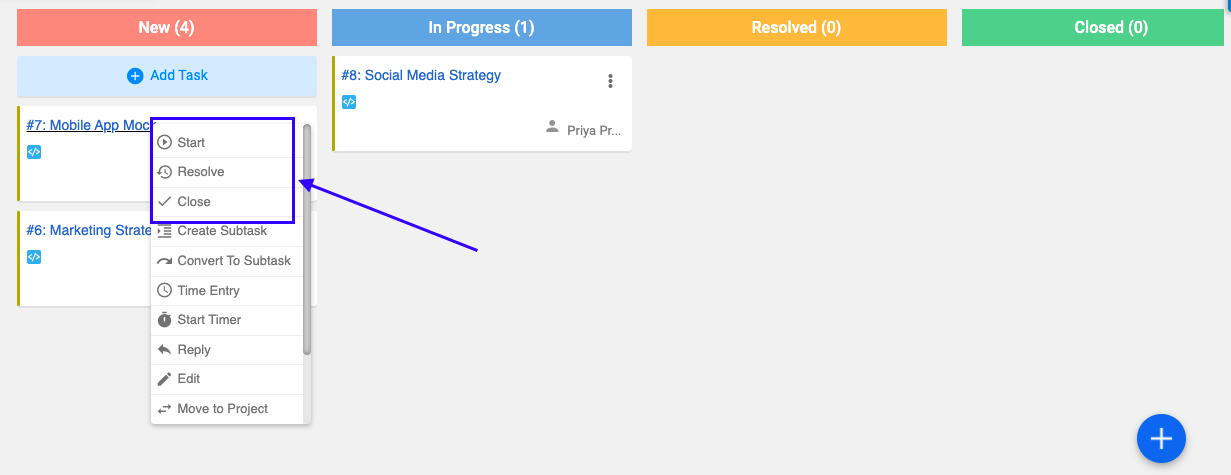
On the kanban view page, when users made the changes on the task status, the tasks were not moving instantly. 

Either you had to drag it or need to reload the page to find the appropriate status.

With this update, the task statuses are changing instantly.

Kanban View

Sub-Task View Enhancement

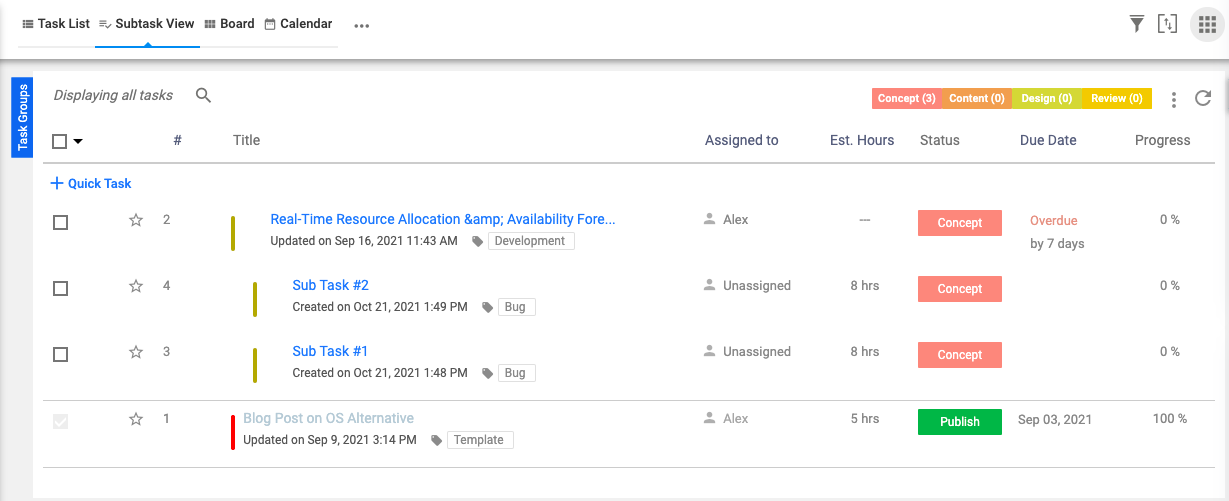
This enhancement was brought into action after our new user reported an issue. On the sub-task view page, the appropriate subtasks are showing within the page but the “Sub Task” header was not showing to the new users.

With this update, we also have covered this issue.

Sub Task View

Time Log List At Task Detail Page

On the task detail page, when users were adding their time log, the time log list was not getting updated instantly at this page.

Users needed to reload the task details page to find their time log list.

With this enhancement, we have fixed that issue. Now users can able to see their time log entry status instantly without reloading the page.

Time Log List

Coming Soon

Github Integration

GitHub-Integration

The new Github Integration feature is already available in Orangescrum! With the enhancement, you can see your development code repositories, branches, code pull-push request, and their status under a task.

SSO Integration

SSO Integration

Now you can enjoy a seamless SSO experience and never have to log in again. You deserve a modern and easy digital experience and we’re here to give it to you!

Conclusion

Orangescrum is a project management tool that offers tons of benefits for your product development process.

With our roadmap template, you can create a visual representation of your product’s development process with ease.

All of these new features mean a little less stress on your plate. You can get back to focusing on what matters most: supporting your team in creating a fantastic product.

Let’s make a try.


Wednesday, 14 August 2019

GitHub Integration for Orangescrum Cloud Released!


We are delighted to announce that starting today Orangescrum provides two-way integration with GitHub.

With this release, you can create, collaborate and manage all your GitHub issues directly from Orangescrum or GitHub instantly.

This integration is fruitful for the IT and product development teams who use GitHub to share or collaborate code and monitor code issues.

Most developers, IT teams and agencies use GitHub to organize, release and track issues on their code. If an issue is raised for your code, you will get an instant notification from Orangescrum and the issue will be created as a task for you in Orangescrum.

We make your task and issue management easier by bringing them together on a single platform of your choice.

GitHub or Orangescrum you are always on top of your tasks and issues so that you focus on delivering quality products for your customers.

With GitHub integration, you can sync the following data:-
●       Task Title
●       Task Description
●       Comments
●       Task Status

Currently, tasks type, labels, file attachments, sub-tasks, assigned to details are not being synced. However, we are working on this.

If a task is in New, In-progress or Resolve status in Orangescrum, in GitHub, the task will be assigned to open status. For closed tasks in Orangescrum, GitHub assigns status as Closed.

Read the full article at Orangescrum Blog