Thursday, 2 March 2017

Orangescrum Learning Series: #5 How Kanban increases your Team’s Productivity

http://blog.orangescrum.com/2017/02/orangescrum-learning-series-5-kanban-increases-teams-productivity.html

With never ending work and little time at hand, a simpler approach to work management in the need of the hour. With so many things on our mind, it keeps getting harder to stay on track. Moreover, with new tasks popping up every minute, it seems impossible to stick to a strict routine and follow our to-do list.

But being productive and on top of all things is a necessity and no longer a choice! Orangescrum’s Kanban view is our effort to help you be at your productive best!

We have been using our own Kanban feature for our daily task management; especially I used it to track all my tasks – TO DO, TO BE DONE & DONE!
So I bring to you the next in our learning series “How Kanban increases your Team’s Productivity?”

The Kanban view is preferred because of the multitude of benefits it represents:

Interactive
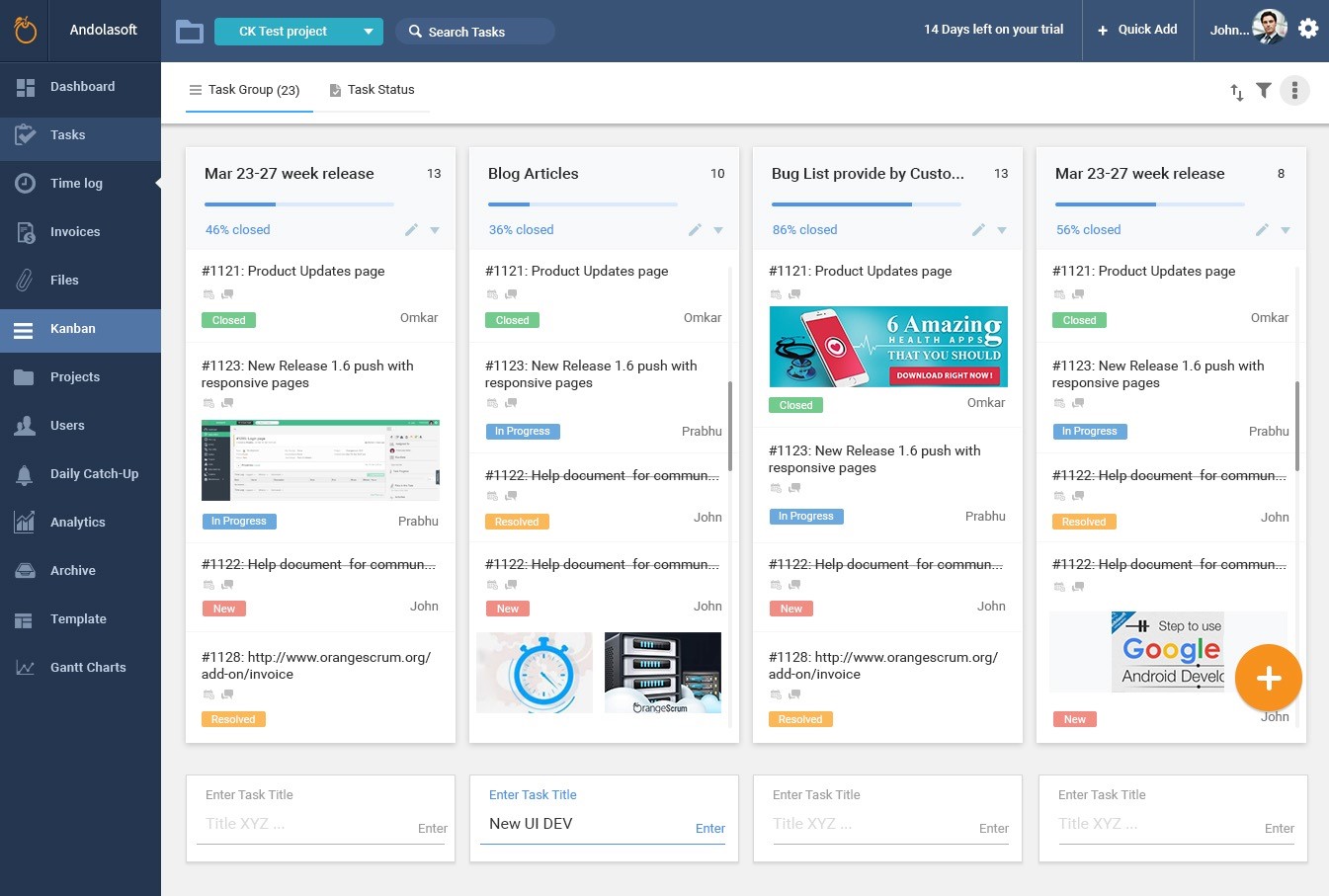
Kanban view is a visual approach to our tasks and important project milestones. You can manage all your tasks, milestones, drag and drop tasks between milestones and statuses and much more in this view. This is where real actions take place.


Productivity Booster

All changes/actions performed in this view reflect across the project. A neat card arrangement lets you focus on the key tasks at hand. A simple glance and you know what needs your attention right now. In other words it is a live planning dashboard. 

Real-Time Status Updates

Whether you are in the Milestone or Tasks the changes are effective in real time with all actions caught in the task history as well as the project activity feeds. Transparent communication without any noise. 


Single pane of view to Project progress

Kanban view quickly shows you the progress based on the estimated hours, hours spent and due dates. This way you never miss on what is round the corner and no tasks have a place to fall off your radar.

Personalized View

Each team member can rearrange the layout of the Kanban view based on their milestone and task status preferences. 

Note: You can add custom task statuses in Open Source edition only. But with Milestones/Task Groups, you can create your own Kanban view in both open source and cloud edition. 

Over time our customers and users have identified and agreed that Kanban View has helped them and their teams –
  • To be highly organized and well planned
  • Increase their productivity and save time from duplicity of efforts
  • Better collaboration among the team
  • Transparent communication and information sharing 
  • And most importantly – driving attention to the right tasks at the right times 


Orangescrum Learning Series: #4 How to Maximize Efficiency by Grouping Tasks

http://blog.orangescrum.com/2017/02/orangescrum-learning-series-4-maximize-efficiency-grouping-tasks.html

In the previous chapter, we mentioned how one can categorize a task. But sometimes we need even sub-categories to define & group similar tasks for better management & monitoring.

Let’s say we have created a Task type “Email Campaign” to define tasks related to our email campaign. Whenever we need we can find the task details or procedure required or template we use for email campaign from these Tasks by using the filter.


But here is the problem. The Email Campaign may be for Sales or maybe it is a marketing email. Again we need to categorize the Task related to Email Campaign. So the Task type “Email Campaign” doesn’t help us. We need to create again two task types “Email Campaign for Sales” & “Email Campaign for Marketing”.


Now we have two task types and we can use to define & monitor for sales and follow-ups. But what about if we have a feature to group these two task types under one category?

That is where Orangescrum comes to your rescue. You can use the “Task Group” feature (don’t confuse with Task Status Group add-on of community edition) to categorize tasks which can be even sub-categorized by Task Types.


In this case, you can create a Task group “Email Campaign” and under that you can add these task types “Email Campaign for Sales” & “Email Campaign for Marketing” related tasks. 

Wednesday, 1 March 2017

Orangescrum Learning Series: #3 How Task Types Helps you to manage your To-Dos


The price of success is hard work, dedication to the job at hand, and the determination that whether we win or lose, we have applied the best of ourselves to the task at hand. ~ Vince Lombardi

Well, in Professional life you can’t ignore it. Whether you follow or not but this is what you do every day at your workplace. Even we all follow the same rule at home or personal life. Are you wondering what I am talking about? Yes, I am talking about Task Management!

You may not be following it strictly, but you can’t ignore/deny its importance in professional life. 

I can say, Managers or Team Leads less manage tasks & more manage projects, to say it clearly they do macro level management as they’re managing different and multiple projects at a time; but it is the resources who manage, organize and work on their tasks by selecting the task priority considering the value, importance & task types. 

Last week, we have talked about how you can define the task priorities. This week we’ll be talking about categorizing your tasks which can help you organize your tasks better, define a lifecycle of a task & maximize your productivity. 

The task types are used to indicate contexts or categorize your tasks, which enables quick identification of the important ones from your “To-Do” list.


If you’re a developer, then you must have been assigned tasks for developing new features or Theme Customization. You can categorize tasks as “Feature Development”, “Theme Customization” etc. Sometime the customer may ask you to change the design or content, you can easily segregate all such tasks by creating a task type “change request” to highlight that it has been changed as per the customer’s request.